

 The Traders Dynamic Index (TDI) EA for MT4 is a professional trend-following MetaTrader 4 expert advisor that uses the powerful TDI indicator to identify high-probability trade entries. It can combine TDI signals with Moving Averages, Stochastic Oscillator, and price action filters, making it one of the most versatile automated trading tools for Forex trend trading.
- Accurately identifies market trend using the Traders Dynamic Index (TDI) indicator
- Generates trade entries and exits based on TDI signals or Moving Averages
- Offers flexible trade management including lot size control, trailing stop, breakeven, and session filters
- Supports multiple confirmation filters such as Stochastic and swing zones for higher accuracy
The RobotFX Traders Dynamic Index Expert Advisor is built specifically for traders who love the TDI indicator. The Traders Dynamic Index combines RSI, Moving Averages, and volatility bands into one powerful tool that shows trend direction, momentum, and market volatility at a glance. This TDI EA for MT4 automates the entire process, allowing you to trade the trend with confidence while removing emotional decision-making.

In the chart above you can see one of the common ways to read the TDI indicator: the yellow line shows the main trend, while crosses between the green and red lines often signal potential entries.

|
| In this example, the EA trades with the trend (green candles = buy) and enters trades when the TDI green moving average rises above the TDI red moving average. The trade exits when the Stochastic leaves its overbought zone, set at 95 for this example. |

|
| The TDI EA determines the trend using the MA Trend and uses Stochastic as a confirmation filter. Entries are triggered by TDI red/green moving average crosses. Several TDI signals are ignored due to confirmation criteria. Trades are opened and closed based on combined TDI and Stochastic conditions. |
|
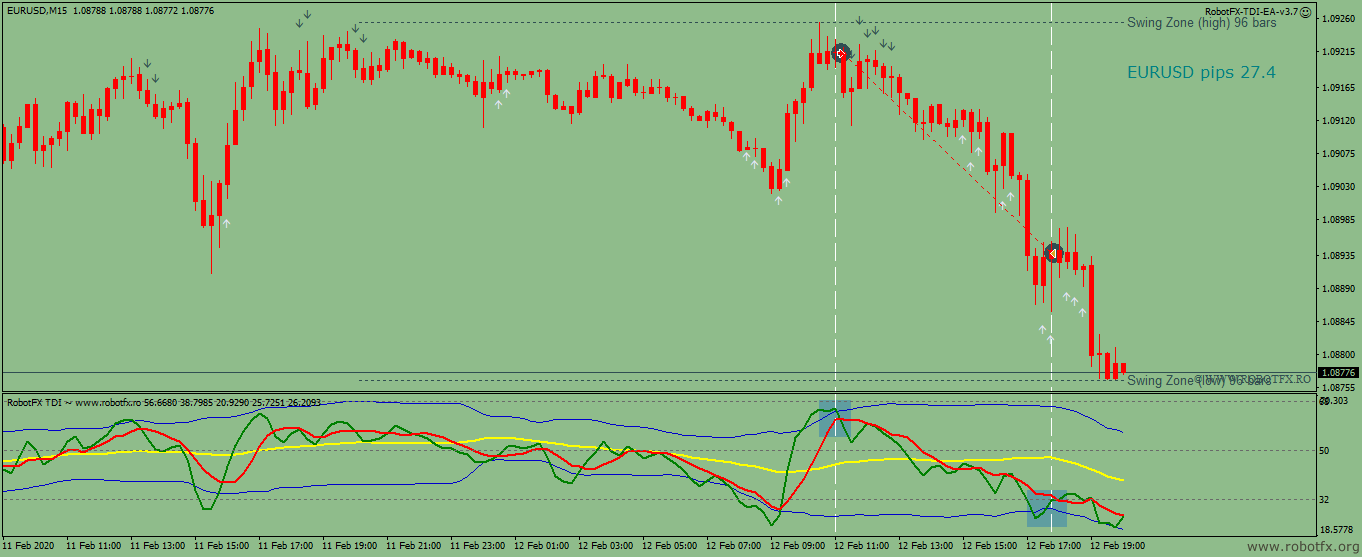
| This trade follows the trend (red candles = price below MA). Entry occurs when TDI green MA crosses the upper volatility band down; the same signal is used for exits. Swing zone confirmation is applied to enhance trade accuracy. |

|
| Here, the TDI EA trades without trend detection or confirmation. Entries and exits are based solely on TDI green line crossing the volatility bands. White vertical lines mark entries; black lines mark exits. This strategy aims to capture large market moves efficiently. |

|
| The TDI EA follows the MA Trend for trading (sell below MA, buy above MA) and opens trades based on the TDI green moving average slope. Maximum three trades are allowed; exits are triggered when TDI green and red lines cross. Profit/loss from individual trades is managed to ensure overall basket profitability. |

- Enter your Client Email - fill this with your email IF you are using a paid version of this EA on a LIVE account
- Sunday to Friday - Indicate whether or not you want to trade each specific day.
- NFP Friday - Whether or not you want to trade on volatile Non-Farm payroll Friday, first Friday of the month.
- Thursday Before NFP - Whether or not you want to trade on the Thursday before the volatile Non-Farm Payroll Friday.
- Christmas Holidays - Whether or not you want to trade during a custom defined period in December, during the low liquidity of the Christmas Holidays.
- Christmas Holidays Start (20th Dec) - This is the day in December you will start to filter out, as the beginning of the Christmas Holiday. Default is 20th, you can enter any date instead of 20.
- New Years Holidays - Whether or not you want to trade during a custom defined period in the beginning of January, the low liquidity of the New Years Holidays.
- New Years Holidays End (5th Jan) - This is the day in January you stop the filter, the end of the New Years holiday period. Default is 5th January, you can enter any date instead of 5.
- Auto GMT Offset - Indicate if you want auto GMT offset turned on or off. Turn off during back testing.
- Manual GMT Offset - If AutoGMTOffset is turned off, indicate what your manual GMT offset would be.
- Enable Trading Session - Set to false to ignore the below trading sessions, or to true to trade within the sessions.
- Trade Tokio Session - Whether or not to trade Asian session.
- Start Tokio Session - Do not trade before this time. If you include Australia, Sydney starts at 21.00, and Tokyo starts at 23.00 GMT.
- Finish Tokio Session - Do not trade after this time. Defaulted at 07.00, the start of the European Session. Note: The Tokyo session continues on for 1 more hour to end at 08.00, so if you are interested in trading this session in its entirety, you should indicate from 23:00 to 08.00.
- Trade London Session - Whether or not to trade European session
- Start London Session - Do not trade before this time. Defaulted at 7.00 GMT, the start of the London Session, though Germany does not open till 08.00.
- Finish London Session - Do not trade after this time. Note: The European Session continues till 16.00, so if you are interested in trading this session in entirety, you should have your defaults from 7.00 to 16.00.
- Trade New York Session - Whether or not to trade the New York session.
- Start New York Session - Do not Trade before this time. Note that the NY stock exchange does not open till 9:30 EST, or 13.30 GMT, and the first hour and half (from 9:30 to 11:00 EST, or 13:30 to 15:00 GMT) is heavy trading, lots of liquidity.
- Finish New York Session - Do not Trade after this time.
- Buy Trades - Enable/disable long trades
- Sell Trades - Enable/disable short trades
- Lotsize - set the lotsize, as fix amount or equity percent
- Enable Money Management - set to true to use the Lotsize as equity percent instead on fixed amount
- Stop Loss - set the stoploss in pips
- Take Profit - set the take profit in pips
- Slippage - the slippage in pips
- Minimum Profit - set the minimum profit needed to close a trade or a basket; this applies to the following trade closing criteria:
- Settings for the moving average indicator (MA Trend) that can be used to determine the trend in enabled in the Determine the Trend by
- Settings for the moving average indicator (MA Signal) that can be used to enter a trade in enabled in the Trade by MA Signal price cross and/or Close at Price/MA Signal cross
- Settings for the stochastic indicator if enabled in the Confirm Entry by
- Settings for the Traders Dynamic Index that can be used to determine the trend, the trade entries and also to exit opened trades
- RobotFX TDI Indicator Name (without .ex4) - do not change this, as this is the name of thee RobotFX TDI indicator that is needed by the expert advisor to function properly
- MA Trend Indicator - if selected, it establishes an uptrend if the price is above the MA Trend, and a downtrend if the price is below the Ma Trend
- TDI Green/Yellow position - if selected, the EA considers an uptrend when the TDI green moving average is above the yellow line, and a downtrend when it is below it
- TDI Yellow slope - if selected, the TDI's yellow moving average slope is used to determine the price trend; rising slope means an uptrend, falling is a downtrend
- No Trend - disables the trend detector
- Stochastic Overbought/Oversold - if chosen, the EA will sell only when the price is in the Stochastic's overbought area, and buy only if oversold
- Swing Zone Price Position - if chosen, the EA will enter a trade only if the price is at a distance of at least the Pips Away From Last Swing (in pips) from the latest highest high or lowest low (depending on the trend) that happened during the latest Swing Zone Bars (candlesticks)
- No confirmation - disables the confirmation filter
- Settings for the EA to enter a trade based on the TDI moving averages and/or the MA Signal
- Break Even/Trailing Stop - sets the breakeven and the trailing stop in pips
- Trailing Step (pips) - sets the trailing step in pips; set to a very high value if there is no need to trail the price
- Trailing Buffer - buffer, in pips, used by the stoploss
- Close at ... - Various settings for the EA to exit trades based on the TDI moving averages and/or the MA Signal
- Close at opposite signal - Close opened trades whenever an opposite signal occurs
- Close at same signal - Close opened trades whenever a similar signal occurs
- "Close at..." obeys the Minimum Profit - Set to true and the EA will close the trades only if their profits reached the Minimum Profit
Example: if you instruct the EA to close the opened trades if an opposite trades signal occurs (Close at opposite signal = true), and the "Close at..." obeys the Minimum Profit is set to true, the EA close the opened trade/s whenever there is an opposite signal, but only if its/their profit already reached the Minimum Profit.
- Close basket of opposite trades when Minimum Profit is reached - if there are both long and short trades on the same chart and this is enabled, the EA will attempt to close all as soon as their cumulative profit reaches Minimum Profit
- Enable Martingale - enable/disable the next trade's lotsize multiplier, if the previous trade closed with negative profit
- Martingale Multiplier - if the above scenario occurs, the next trade's lotsize will be equal to the previous trade's lotsize multiplied by this number
- Retry Martingale - how many times to enable the multiplier, if the next trades are also negative profit; set this to a realistic number, because increasing the lotsize over and over might lead to your account hitting a margin
- Trades' Comment - used for monitoring opened/closed trades
- Magic Number - set a different number if you want to use the EA multiple times on the same chart/pair
How to Use Traders Dynamic Index EA MT4
- Install the TDI EA along with the RobotFX TDI indicator on your MetaTrader 4 platform.
- Attach the EA to your preferred currency pair on H1 or H4 timeframe.
- Choose your trend detection method (TDI Yellow Slope, Green/Yellow position, MA Trend, or combination).
- Configure entry confirmation filters (Stochastic, Swing Zone, etc.) and risk management settings.
- Enable or disable additional tools like Martingale and session filters according to your trading style.
- Allow AutoTrading and let the EA automatically detect TDI signals and manage trades.
Frequently Asked Questions
Q: Is the TDI EA only for MT4?
Yes, this expert advisor is developed exclusively for MetaTrader 4.
Q: What is the Traders Dynamic Index (TDI) indicator?
The TDI is a versatile indicator that combines RSI, Moving Averages, and Bollinger Bands to show trend direction, momentum, and volatility in one view.
Q: Can I use the TDI EA without the TDI indicator?
No. The EA requires the RobotFX TDI indicator to function properly.
Q: Does it support multiple confirmation filters?
Yes. You can combine TDI signals with Moving Averages, Stochastic, and Swing Zone confirmation for better accuracy.
Q: Is this EA suitable for beginners?
Yes. While powerful, it includes many presets. We recommend starting on a demo account to understand how different settings affect performance.




Please do not spam; comments and reviews are verified prior to publishing.